Source: unfriendlygrinch - Mar 16, 2022
Traditionally speaking, the OpenBSD kernel routing system has a single table for routes. This means it only allows non-conflicting IP address assignments and all network interfaces on the system are connected to a single routing table.
Therefore, by default, all interfaces on an OpenBSD server belong to rdomain 0. Assuming that IP Forwarding is enabled and pf(4) allows it, traffic will flow freely between all interfaces. This functionality is also present in userland tools such as dhclient(8), dhcpd(8), and in the routing protocol daemons ospfd(8), and bgpd(8). The ability to have routing domains first appeared in OpenBSD 4.6, allowing for virtual routing and firewalling.
About rdomain and rtable
Each rdomain has a completely independent address space in the kernel. Consequently, an IP address can be assigned in more than one rdomain, but it cannot be assigned more than once per rdomain.
Interfaces in different routing domains are separated and can not directly pass traffic between each other and as such network traffic inside the rdomain stays within the current routing domain. To move traffic from one rdomain to another, pf(4) is required.
When an interface is assigned to a non-existent rdomain, it is automatically created. A rtable with the same ID is also created, along with a lo(4) loopback interface with a unit number matching the routing domain ID, and assigned to the new domain.
Limitation: The highest ID that can be used for rdomain is 255, which basically means the maximum number of routing domains is 256. CARP pseudo-devices carp(4) must be in the same rdomain as the interface they’re attached to (carpdev).
rtables contain routes for outbound network packets. One rdomain can contain more than one rtable. Multiple routing tables are commonly used for Policy Based Routing, and the same limitation on the highest ID applies as for rdomain (highest being 255).
Peter Hessler gave a better description in his BSDCan 2015 paper, by comparing the two:
- rtable
- alternate routing table, can be used by the same interfaces.
- IP addresses can NOT overlap.
- Multiple rtables can belong to one rdomain.
- Useful for Policy Based Routing.
- rdomain
- completely separate routing table instance.
- can have 10.0.0.1/16 assigned multiple times.
- Interfaces are assigned to exactly one rdomain at a time.
- Decides how the system “sees” the incoming packet to determine which table to use.
- An rdomain always contains at least one rtable.
Use case
Using rdomain is similar to VRF in Cisco IOS. This VRF-like mechanism provided by rdomain/rtable is very useful for solving routing issues in non-typical network setups or to isolate multi-tenant traffic without using more advanced methods such as MPLS.
For example, if you have two servers with exactly the same IP addresses and gateway, rdomain can accommodate the traffic from both servers without changing their IP or routing configuration.
When applying network segmentation via VLANs, traffic from several customers could be aggregated on a Provider Edge (PE). By having a different routing domain for each customer, the prefixes going through the OpenBSD router will never be mixed.
Setup
The diagram below shows a network topology designed for two customers. vlan6 (192.168.1.0/24) and vlan60 (172.16.60.0/24) resources belong to rdomain 1 and should be accessible only by Customer 1. Similarly, vlan7 (172.16.7.0/30) and vlan70 (172.16.70.0/24) belong to rdomain 2 for Customer 2.
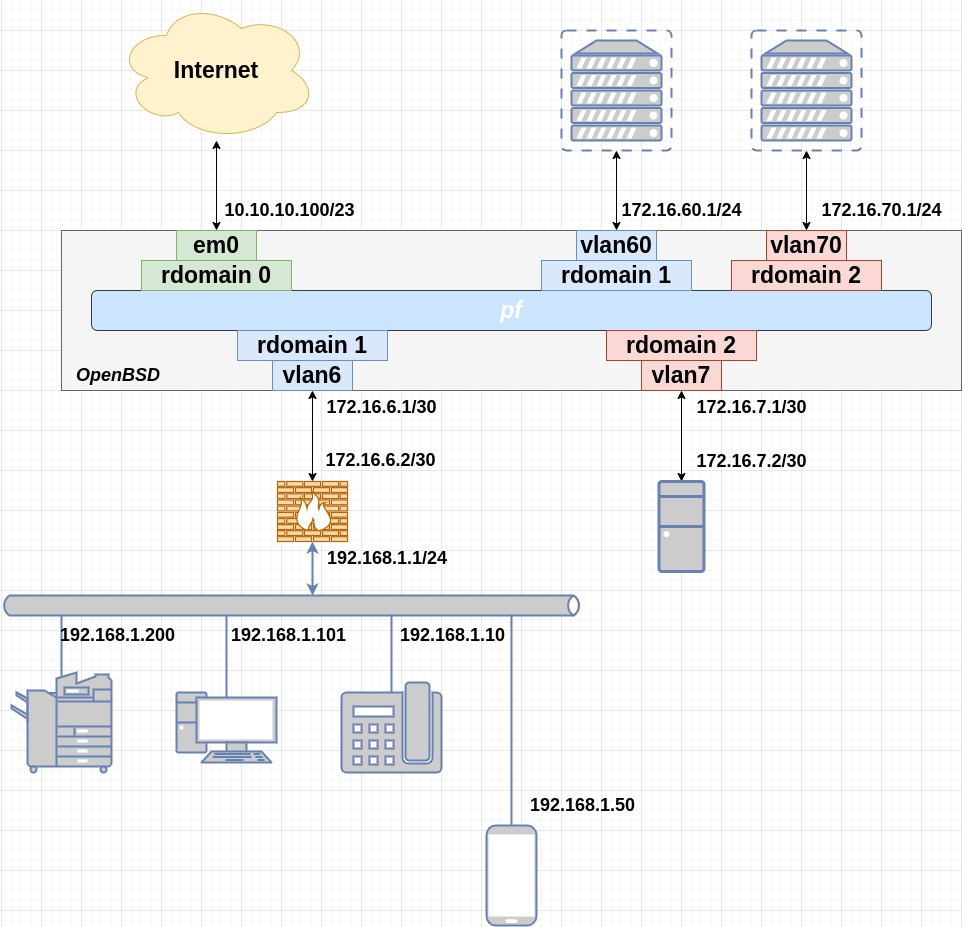
The non-persistent configuration for this example, using em0 as the interface connected to the internet:
$ doas ifconfig em0 up
$ doas ifconfig em0 10.10.10.100/23
$ doas route -n add default 10.10.11.254
Check the interface status:
$ ifconfig em0
em0: flags=8843<UP,BROADCAST,RUNNING,SIMPLEX,MULTICAST> mtu 1500
	lladdr 00:50:56:8e:6a:db
	description: INTERNET
	index 1 priority 0 llprio 3
	groups: egress
	media: Ethernet autoselect (1000baseT full-duplex,master)
	status: active
	inet 10.10.10.100 netmask 0xfffffe00 broadcast 10.10.11.255
Now add the customer-related network configuration. Use the rdomain parameter of ifconfig(8) to set the interface routing domain. By default, route(8) uses the current routing table. Use the -T flag to select an alternate routing table for modification or querying. To force a process and its children to use a specific routing table and routing domain, execute:
$ doas route [-T rtable] exec [command ...]
Customer 1 configuration
$ doas ifconfig vlan6 rdomain 1
$ doas ifconfig vlan6 172.16.6.1/30
$ doas ifconfig vlan60 rdomain 1
$ doas ifconfig vlan60 172.16.60.1/30
$ doas ifconfig lo1 rdomain 1
$ doas ifconfig lo1 inet 127.0.0.1/8
$ doas route -T1 -qn add -inet 127 127.0.0.1 -reject
$ doas route -T1 -qn add default 127.0.0.1 -blackhole
$ doas route -T1 -qn add -inet 192.168.1.0/24 172.16.6.2
Customer 2 configuration
$ doas ifconfig vlan7 rdomain 2
$ doas ifconfig vlan7 172.16.7.1/30
$ doas ifconfig vlan70 rdomain 2
$ doas ifconfig vlan70 172.16.70.1/30
$ doas ifconfig lo2 rdomain 2
$ doas ifconfig lo2 inet 127.0.0.1/8
$ doas route -T2 -qn add -inet 127 127.0.0.1 -reject
$ doas route -T2 -qn add default 127.0.0.1 -blackhole
$ doas route -T2 -qn add -inet 10.0.70.0/24 172.16.7.2
Checking the routing tables:
$ route -T1 -n show -inet
Routing tables

Internet:
Destination        Gateway            Flags   Refs      Use   Mtu  Prio Interface
default            127.0.0.1          BGS        0        0 32768     8 lo1
127/8              127.0.0.1          BGRP       0        0 32768     8 lo1
127.0.0.1          127.0.0.1          UHl        0        0 32768     1 lo1
172.16.6.0/30      172.16.6.1         UCn        1        0     -     4 vlan6
172.16.6.1         00:50:56:8e:6a:db  HLl        0        0     -     1 vlan6
172.16.6.2         00:50:56:8e:61:99  UHLc       0        1     -     3 vlan6
172.16.60.0/30     172.16.60.1        UCn        0        0     -     4 vlan60
172.16.60.1        00:50:56:8e:6a:db  HLl        0        0     -     1 vlan60
192.168.1.0/24     172.16.6.2         UGS        0        0     -     8 vlan6
$ route -T2 -n show -inet
Routing tables

Internet:
Destination        Gateway            Flags   Refs      Use   Mtu  Prio Interface
default            127.0.0.1          BGS        0        0 32768     8 lo2
10.0.70.0/24       172.16.7.2         UGS        0        0     -     8 vlan7
127/8              127.0.0.1          BGRP       0        0 32768     8 lo2
127.0.0.1          127.0.0.1          UHl        0        0 32768     1 lo2
172.16.7.0/30      172.16.7.1         UCn        1        0     -     4 vlan7
172.16.7.1         00:50:56:8e:6a:db  HLl        0        0     -     1 vlan7
172.16.7.2         00:50:56:8e:c6:a3  UHLc       0        1     -     3 vlan7
172.16.70.0/30     172.16.70.1        UCn        0        0     -     4 vlan70
172.16.70.1        00:50:56:8e:6a:db  HLl        0        0     -     1 vlan70
Persistent Configuration
The hostname.if(5) configuration for these interfaces would be:
# /etc/hostname.vlan6
vlan 6 vlandev em1 rdomain 1
inet 172.16.6.1 255.255.255.252

# /etc/hostname.vlan60
vlan 60 vlandev em1 rdomain 1
inet 172.16.60.1 255.255.255.252

# /etc/hostname.lo1
rdomain 1
inet 127.0.0.1 255.0.0.0
!route -T1 -qn add -inet 127 127.0.0.1 -reject
!route -T1 -qn add default 127.0.0.1 -blackhole
!route -T1 -qn add -inet 192.168.1.0/24 172.16.6.2
PF and rdomain
Packet Filter (pf) can be used to pass traffic between different routing domains. The most basic rule looks like this:
pass in on vlan60 to 10.10.11.254 rtable 0
This rule allows Host 1 (in rdomain 1) to talk to Host 0 (in rdomain 0).
To have bidirectional traffic, you also need to look at the routing entries. The return traffic needs a route to be present in the destination rtable.
$ doas route -T0 add 192.168.1.0/24 127.0.0.1
And don’t forget to make sure that pf(4) is active on the loopback interface, which is skipped in the default configuration:
# set skip on lo
Tools and Services support
Many OpenBSD tools and services have built-in support for rtables and rdomains.
Tools
netstat(1):-Twill select an alternate routing table to query.route(8):-Twill select an alternate routing table.arp(8)/ndp(8):-Vwill select the routing domain.ping(8):-Vwill set the routing table for outgoing packets.traceroute(8):-Vwill set the routing table.nc(1):-Vwill set the routing table.ps(1):rtableis amongst the available keywords.$ doas ps -auxwo rtable | grep 'bgpd'
Services
sshd(8):sshcan be configured to only listen on a specific rtable.ntpd(8):ntpservers and sensors can be restricted to an rtable.bgpd(8): can listen on multiple rtables and use them for routing decisions.rcctl(8):rtablecan be set for services.# rcctl set bgpd rtable 1
See also
- Virtualizing the OpenBSD Routing Table - Joel Knight
- OpenBSD rtables and rdomains - Stephan Rickauer
- Using routing domains and routing tables in a production network - Peter Hessler, BSDCan 2015
- OpenBSD pf+rdomains create splendid multi-tenancy firewalls - Philipp Bühler, BSDCan 2017